




Create a realistic key-to-motorcycle transformation video using Google Flow and Veo. Includes a copy-paste AI prompt, setup guide, and professional tips for cinematic results
Key to Motorcycle Transformation AI Video Prompt (Google Flow & Veo)
Creating realistic transformation videos with AI has become one of the most popular trends in cinematic content creation. One of the most visually satisfying concepts is transforming a simple object into a fully assembled motorcycle through realistic mechanical animation.
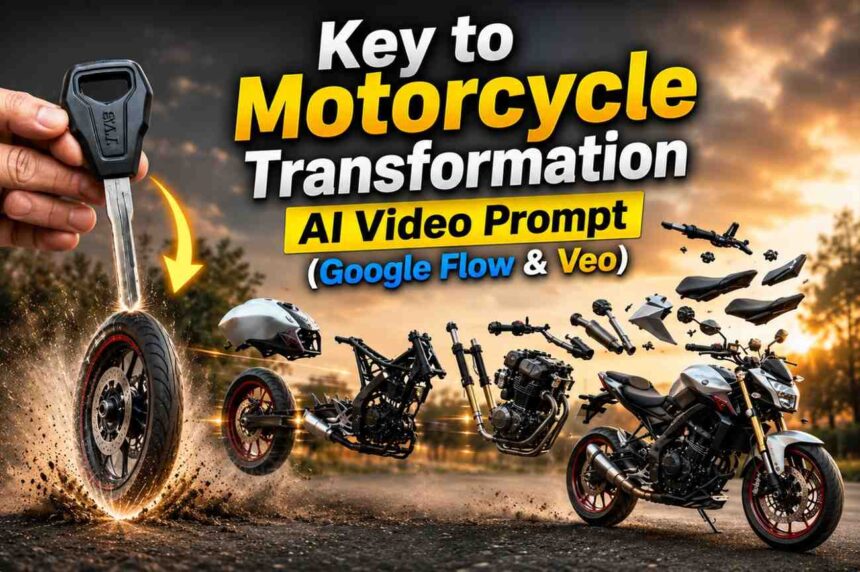
This Key to Motorcycle Transformation Prompt is designed for Google Flow and Veo, enabling creators to generate a smooth sequence where a falling key transforms into a motorcycle wheel and gradually assembles into a complete motorcycle. The animation focuses on realistic engineering-inspired motion, dust effects, sequential assembly, and cinematic visual storytelling.
Why This Prompt Works
Unlike generic transformation prompts that often create chaotic results, this prompt follows a strict assembly sequence. Each motorcycle component appears individually and attaches in a logical order, helping the AI maintain consistency and realism.
Key features include:
- Smooth slow-motion object transformation
- Sequential motorcycle assembly
- Realistic mechanical movements
- Motion blur and dust simulation
- Cinematic camera behavior
- Physically believable part alignment
- Seamless transition into the final motorcycle design
This approach produces videos that feel closer to professional CGI animations rather than random AI-generated morphing effects.
Best Use Cases
This prompt is ideal for:
- Motorcycle promotional videos
- Automotive marketing content
- AI animation showcases
- YouTube Shorts
- Instagram Reels
- TikTok videos
- Engineering visualization concepts
- Product reveal animations
Copy & Paste Prompt
| The key falls in smooth slow motion and transforms into a rotating motorcycle front tyre as it touches the ground, with soft dust flowing outward. Motorcycle parts enter from outside the frame in a strict step-by-step order: first the fuel tank, then the rear tyre, followed by all remaining components-frame, suspension, engine, exhaust, handlebars, seat, panels, cables, bolts, and body elements-each rotating, aligning, and attaching one by one with precise mechanical motion. The assembly is fast but sequential, with only one major part attaching at a time, enhanced by motion blur, air movement, and ground dust. The motorcycle completes seamlessly into the second image, fully assembled and realistic as dust Settles |
How to Create This Video in Google Flow
Step 1: Open Google Flow
Launch Google Flow and create a new video project.
Step 2: Upload Reference Images
Upload:
- Image 1: The key
- Image 2: The final motorcycle
These images will guide the transformation process and improve visual consistency.
Step 3: Add the Prompt
Copy and paste the prompt above into the scene description field.
Step 4: Configure Settings
Recommended settings:
- Model: Veo
- Quality: High
- Realism: Maximum
- Motion Strength: Medium
- Camera Motion: Minimal
- Duration: 8–12 seconds
Step 5: Generate Multiple Variations
Generate at least 3–5 versions. AI video models often produce different assembly timings, and one version typically delivers superior mechanical realism.
Step 6: Select the Best Output
Choose the version with:
- Clean assembly sequence
- Accurate motorcycle proportions
- Consistent part placement
- Natural dust effects
- Smooth transformation transition
Pro Tips for Better Results
For even more realistic results, add these modifiers:
- Ultra realistic CGI
- Industrial product reveal
- Mechanical engineering precision
- Photorealistic materials
- High-speed cinematic camera
- Dynamic dust particles
- 4K detail
- Professional automotive commercial style
These additions often improve part alignment and overall visual quality.
Final Thoughts
The Key to Motorcycle Transformation Prompt combines cinematic storytelling with realistic mechanical assembly, making it an excellent choice for creators who want professional-looking AI-generated automotive animations. When paired with Google Flow and Veo, it can produce visually impressive transformation sequences suitable for social media, advertising, and creative showcases.
FAQs
1. What is the Key to Motorcycle Transformation AI Video Prompt?
It is a cinematic AI video prompt that transforms a falling key into a fully assembled motorcycle through realistic mechanical assembly and visual effects.
2. Can I use this prompt with Google Flow and Veo?
Yes. The prompt is specifically optimized for Google Flow and Veo, helping generate smooth object transformations and detailed motorcycle assembly animations.
3. Do I need reference images for the best results?
Yes. Using a key image as the starting reference and a motorcycle image as the final reference improves consistency and creates a more accurate transformation sequence.
4. How long should the generated video be?
For the best visual quality, a duration of 8–12 seconds is recommended. This provides enough time for the transformation and sequential assembly to appear natural.
5. Can I customize the motorcycle style in the prompt?
Absolutely. You can replace the motorcycle type with a sport bike, cruiser, dirt bike, superbike, or any custom design while keeping the same transformation and assembly process.