
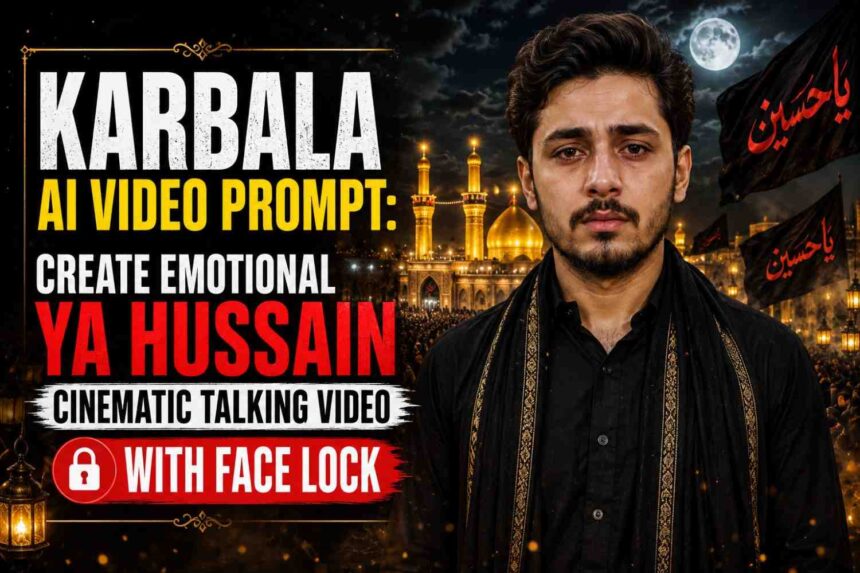
Create an ultra-realistic Karbala AI video with strict face lock, emotional Urdu poetry, cinematic shrine background, and perfect lip sync. Copy the viral Karbala talking video prompt and generate stunning Muharram-themed AI videos
Karbala AI Video Prompt – Create Emotional Ya Hussain Cinematic Talking Video
Muharram is a time of remembrance, reflection, and deep emotions. With modern AI video tools, creators can now transform a simple portrait into a powerful cinematic tribute inspired by the message of Karbala. This prompt is designed to create an emotional talking video where the original person’s identity remains completely unchanged while delivering a moving Urdu couplet dedicated to Imam Hussain (A.S.).
The highlight of this prompt is its strict face lock technology, ensuring that the uploaded image remains exactly the same throughout the entire animation. The face, clothing, hairstyle, skin tone, and body proportions stay untouched while only natural human movements such as blinking, breathing, eye movement, and lip synchronization are animated.
What Makes This Karbala AI Video Prompt Special?
Unlike ordinary AI video prompts that often alter the subject’s appearance, this prompt focuses on preserving identity while creating a highly emotional cinematic atmosphere.
Key Features
✔ Strict Face Lock Protection
✔ Natural Lip Synchronization
✔ Emotional Urdu/Hindi Dialogue Delivery
✔ Cinematic Karbala Night Background
✔ Ya Hussain Flags Animation
✔ Glowing Shrine Environment
✔ Respectful Muharram Atmosphere
✔ Slow Camera Push-In Effect
✔ Realistic Tears and Emotional Expression
✔ Vertical 9:16 Social Media Format
✔ HDR and Ultra Realistic Quality
How to Create Karbala & Muharram AI Videos (Step-by-Step Guide)
Want to create emotional Karbala and Muharram AI videos like the ones trending on Instagram Reels, Facebook, and YouTube Shorts? Follow these simple steps:
Step 1: Visit SRN Help
First, open Google and search SRN Help. Open the website and go to the Muharram AI Prompt section.
Step 2: Choose Your Favorite Muharram Prompt
Browse through the available prompts such as:
- Ya Hussain AI Poster Prompt
- Ya Ali AI Portrait Prompt
- Ya Abbas AI Image Prompt
- Karbala Shrine AI Prompt
- Muharram Talking Video Prompt
Copy the prompt you want to use.
Step 3: Create Your AI Image
Now open ChatGPT or your preferred AI image generator.
Upload your photo and paste the copied prompt.
Generate the image and download the final result. Make sure the face is clear and high quality because this image will be used in the video.
Step 4: Return to SRN Help
After downloading your AI-generated image, come back to SRN Help.
Open the Muharram AI Video Prompt article and copy the video prompt provided there.
Step 5: Open Your AI Video Tool
Use any AI video platform such as:
- Google Flow
- Google Veo
- Kling AI
- Hailuo AI
- PixVerse
Upload the image you created in the previous step.
Step 6: Paste the Video Prompt
Paste the copied Muharram/Karbala video prompt into the prompt box.
The prompt already includes:
✔ Face Lock Instructions
✔ Natural Lip Sync
✔ Karbala Background
✔ Ya Hussain Flags
✔ Emotional Dialogue
✔ Cinematic Camera Movement
✔ Muharram Atmosphere
Step 7: Generate the Video
Click the Generate button and wait for the AI to process your video.
Within a few minutes, the AI will create a realistic Muharram video featuring:
- Natural blinking
- Lip movement
- Emotional expressions
- Karbala shrine background
- Cinematic lighting effects
Step 8: Download and Share
Once the video is ready, download it and share it on:
- Instagram Reels
- Facebook Reels
- YouTube Shorts
- WhatsApp Status
- Telegram Channels
Pro Tips for Best Results
- Use a clear front-facing photo.
- Upload a high-resolution image.
- Avoid blurry or low-light photos.
- Keep the face fully visible.
- Use vertical 9:16 format for social media.
- Choose realistic voice and lip-sync settings.
Final Words
Creating Muharram and Karbala AI videos is now easier than ever. Simply copy the prompt from SRN Help, generate your image using ChatGPT, then use the Muharram Video Prompt in an AI video generator. In just a few steps, you can create powerful and emotional videos inspired by the message of Karbala and the remembrance of Imam Hussain (A.S.).
Prompt here Copy And paste
Prompt
Create a 10-second cinematic video by animating the uploaded image ONLY.
The uploaded image is the FINAL CHARACTER REFERENCE.
STRICT FACE LOCK IS THE HIGHEST PRIORITY.
DO NOT redesign, recreate, reinterpret, beautify, or generate a new face.
The face in every frame MUST remain EXACTLY IDENTICAL to the uploaded image.
Use the uploaded image as the original identity.
Preserve exactly:
• Face shape
• Hair style
• Hairline
• Forehead
• Eyebrows
• Eyes
• Nose
• Lips
• Teeth
• Jawline
• Chin
• Skin tone
• Skin texture
• Facial proportions
• Ear shape
• Neck
• Body proportions
• Hands
• Clothing
• Accessories
100% identical identity.
Zero face swap.
Zero face morphing.
Zero identity drift.
Zero beautification.
Zero AI enhancement.
Zero age change.
Zero hairstyle change.
Zero expression replacement.
The uploaded photo must simply come alive like a real person.
Only allow:
Natural blinking.
Very slight breathing.
Natural eye movement.
Perfect lip movement.
Nothing else should change.
The background transforms into a breathtaking cinematic Karbala night scene featuring the glowing golden shrine associated with Karbala, elegant black Ya Hussain flags waving slowly in the wind, thousands of respectful mourners in the distance, softly glowing lanterns, floating golden particles, cinematic smoke, dramatic clouds, moonlight, volumetric lighting, and a deeply emotional atmosphere.
The person looks directly into the camera with teary eyes, takes a gentle breath, and respectfully recites with natural lip synchronization in a deep emotional voice:
“क़त्ल-ए-हुसैन अस्ल में मर्ग-ए-यज़ीद है…
इस्लाम ज़िंदा होता है हर कर्बला के बाद।”
The dialogue should be delivered slowly with emotional pauses, natural Urdu/Hindi pronunciation, realistic lip sync, and a calm expression of grief and devotion.
Soft background ambience includes distant respectful mourning chants of “Ya Hussain… Ya Hussain…” blended gently with the wind, without overpowering the main voice.
Camera performs a slow cinematic push-in from a medium shot to a close-up while keeping the face perfectly stable.
Hyper realistic.
8K.
HDR.
Unreal Engine quality.
Vertical 9:16.
NEGATIVE PROMPT:
Do not change the face.
Do not generate a new face.
Do not beautify the face.
Do not modify facial proportions.
Do not sharpen facial features.
Do not smooth skin.
Do not change hairstyle.
Do not change skin tone.
Do not change clothing.
Do not change body.
No identity drift.
No face morphing.
No face swap.
No extra people near the subject.
No low quality.
No blur.
No distortion.
No watermark.
No logo.
Keep the uploaded image exactly the same.
Best AI Tools for This Prompt
You can try this prompt in popular AI video generation platforms such as:
- Google Flow
- Google Veo
- Kling AI
- Hailuo AI
- PixVerse
Tips for Better Results
- Use a clear front-facing portrait.
- Avoid sunglasses or face coverings.
- Upload a high-resolution image.
- Ensure good facial visibility.
- Use realistic voice settings.
- Keep the original image well-lit for accurate lip sync.
Conclusion
This Karbala AI Video Prompt is perfect for creating respectful Muharram-themed cinematic videos with emotional storytelling. The strict face lock instructions help maintain the subject’s identity while adding realistic movements, dramatic lighting, and a deeply moving Karbala atmosphere. Whether you’re creating content for social media, remembrance posts, or creative AI showcases, this prompt can help produce visually stunning and emotionally powerful results.
FAQs
1. Which AI tool works best for this Karbala video prompt?
Google Veo, Google Flow, Kling AI, and Hailuo AI generally produce the most realistic talking-video results.
2. Will the face change during animation?
No. The prompt specifically instructs strict face lock and identity preservation.
3. Can I use my own voice instead of AI voice?
Yes, most AI video platforms allow custom voice uploads.
4. What aspect ratio is recommended?
Vertical 9:16 format is best for Instagram Reels, YouTube Shorts, and TikTok.
5. Is this prompt suitable for Muharram content?
Yes. It is designed to create a respectful and emotional Karbala-inspired atmosphere while preserving the subject’s original identity.